Plan the work. Track the hours. Know the cost.
Orrumai keeps your portfolio, Gantt plans, timesheets and expenses together, so every project shows what was budgeted, what it has cost so far, and where it's heading — and you can see who has room for the next one.
We set up your workspace with you, including your first projects.

Every project, on one screen
Projects grouped by customer, with progress, budget, actual and forecast beside a timeline of when each one runs.
Table and timeline together
Each project is one row: the numbers on the left, a bar from its first task to its last on the right, and today marked across them all.
Over budget stands out
Forecasts over budget are flagged in red, and one tick shows only those projects.
Grouped by customer
See everything you are doing for one customer, or open a customer to see their projects on a page of their own.
A plan that keeps up with the work
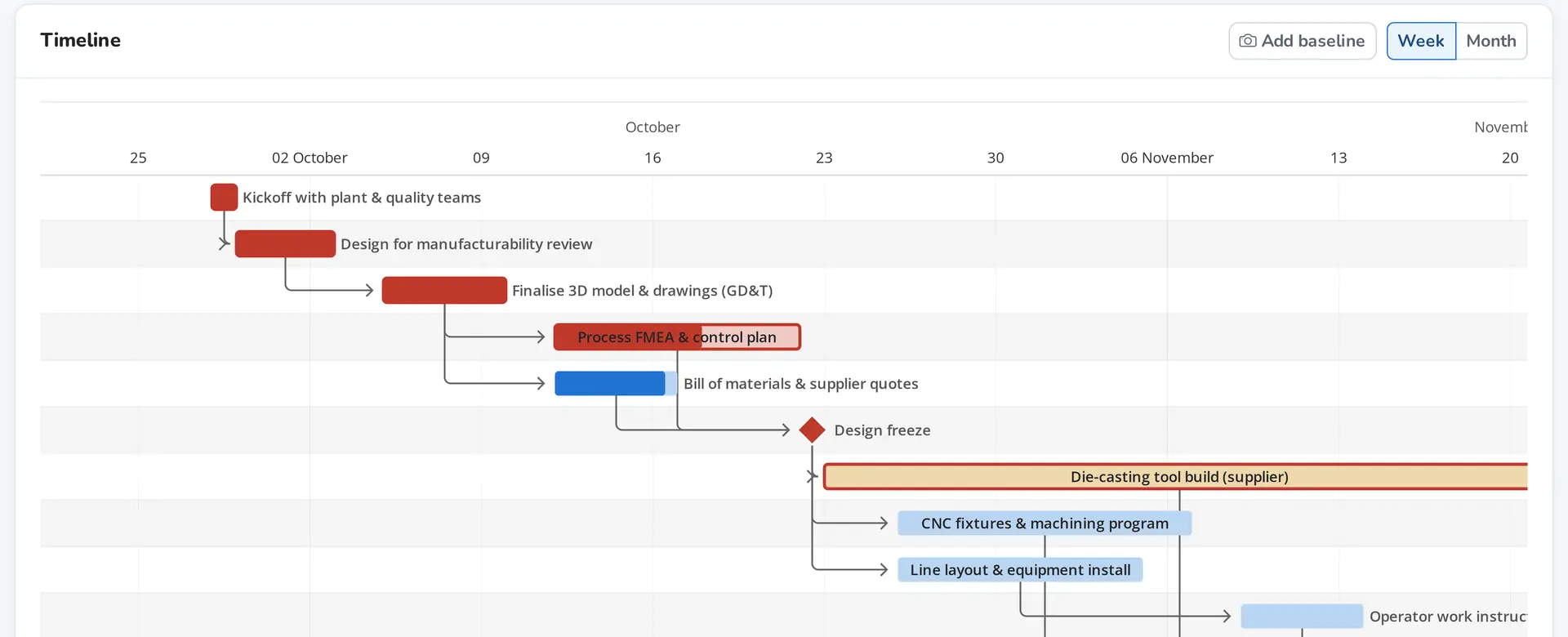
Phases, tasks, dependencies and milestones on a live Gantt. Drag a bar to move a task, and everything that depends on it moves later with it.
- Critical path shown in red: any slip there delays the finish
- Baselines: snapshot the plan and see how far it has moved
- Milestones as diamonds, tasks indented under their phase
A board for the day to day
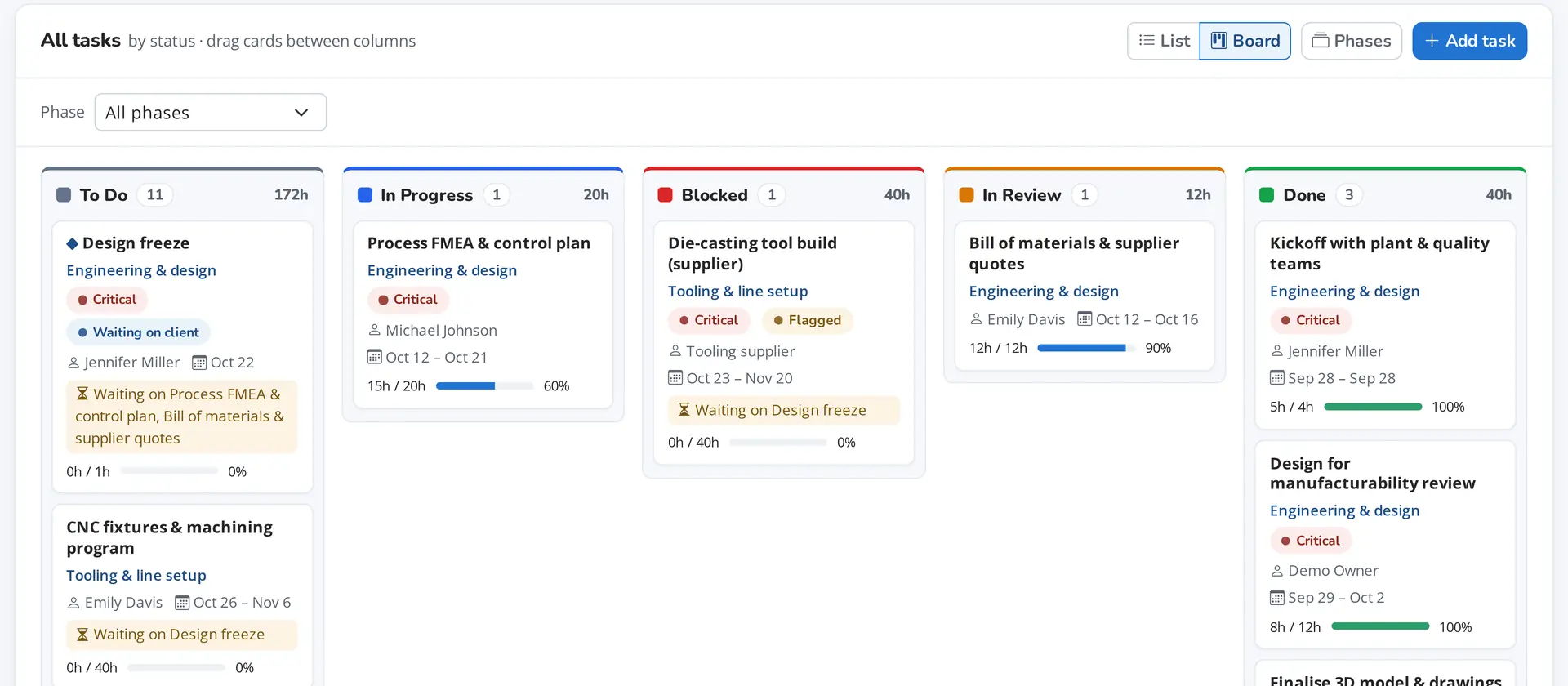
The same tasks as a Kanban board. Drag cards between columns, and set up the statuses your team actually uses.
- Your own statuses, colours and order
- Waiting on client and Flagged, so blockers are visible
- Hours logged against each card's estimate
Budget, actual and forecast, worked out for you
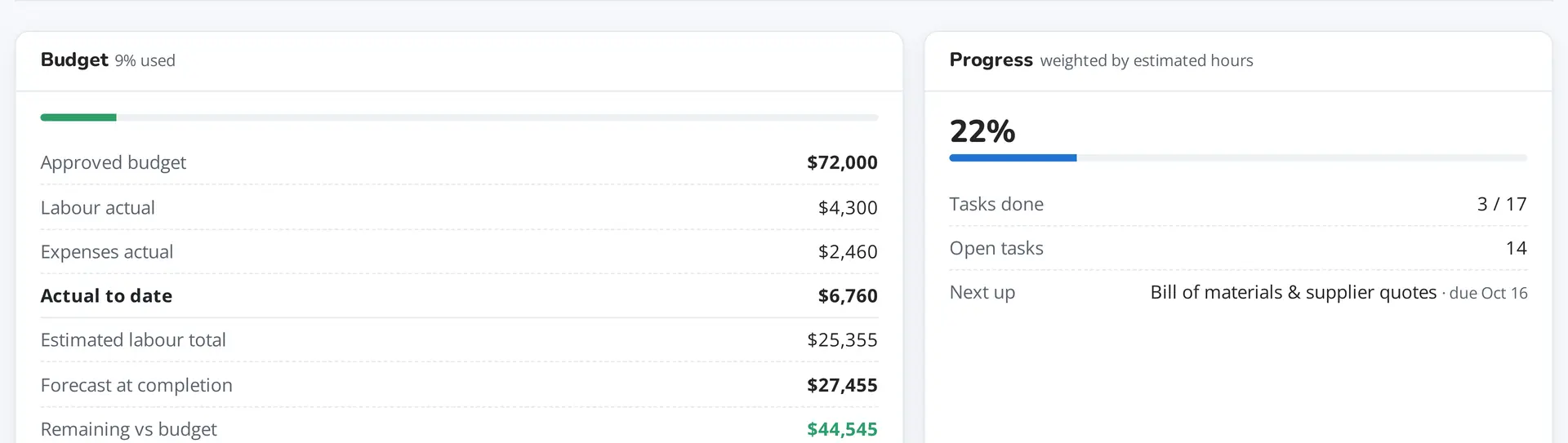
Nobody types in a cost. Actuals come from the hours people log at their rate on the day, plus expenses; the forecast adds what's left of each open task.
- Forecast at completion and remaining budget on every project
- Hours budgets per phase, with a warning when planned work runs over
- Your own expense categories
Weekly timesheets, approved
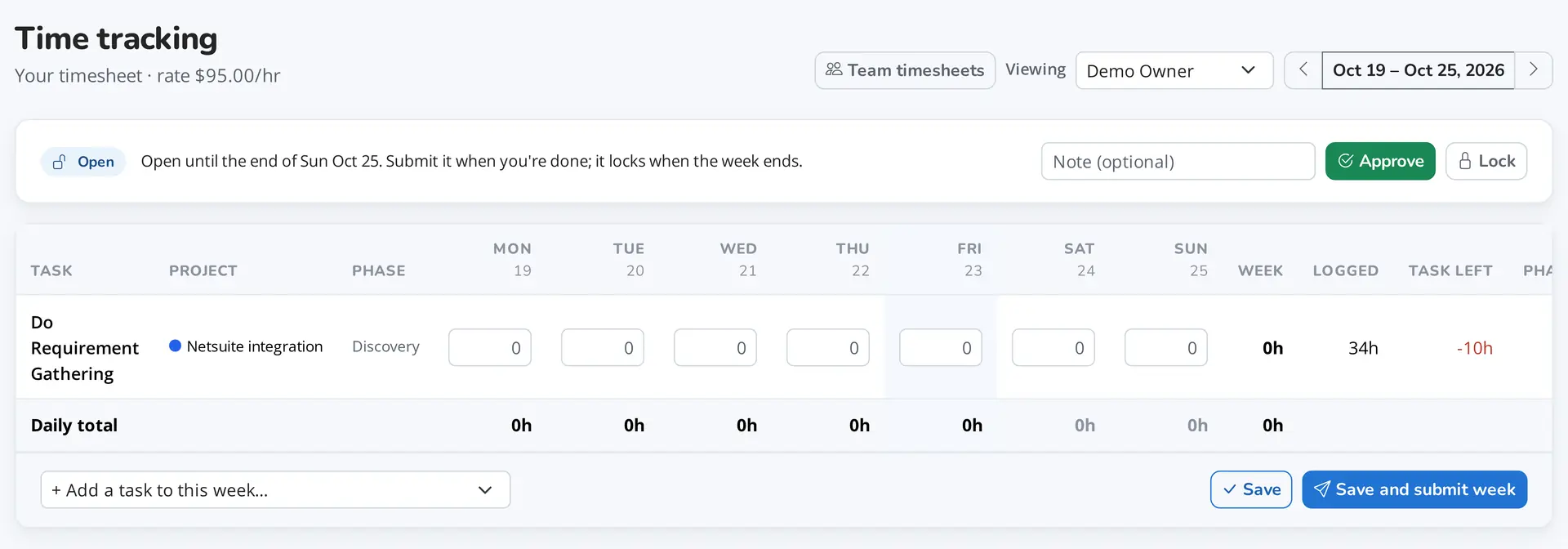
People log hours against their tasks in a simple week view and submit the week. A VP approves it, sends it back, or unlocks a past week.
- Weeks lock when they end
- Hours left on the task and the phase as you type
- Team timesheets for managers and VPs
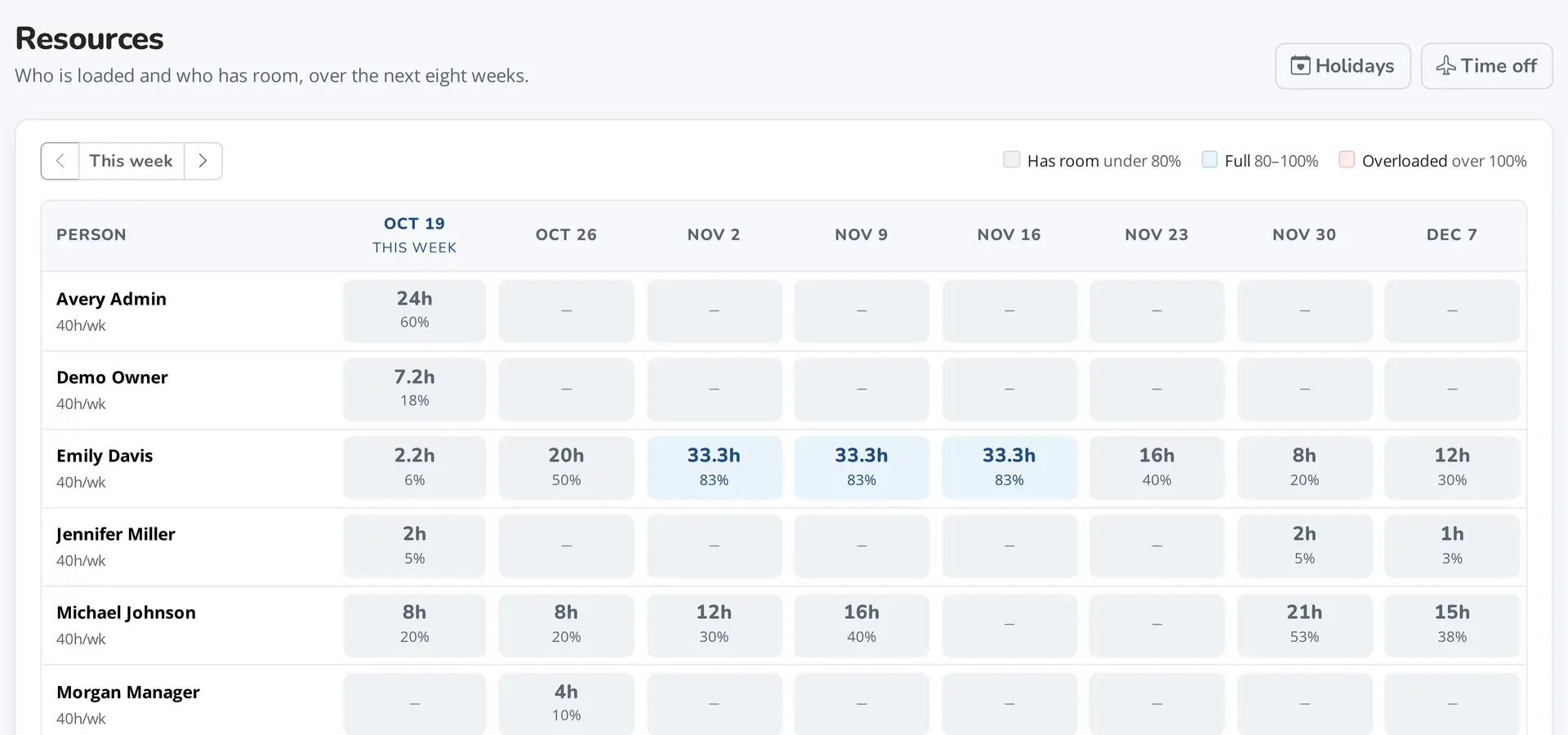
See who has room
Everyone's planned work against their capacity for the next eight weeks, after holidays and time off. Pick a cell to see the tasks and move them.
- Under 80% has room, over 100% is overloaded
- Holidays by country, and time off per person
- Reassign a task, or move it later, from the same panel
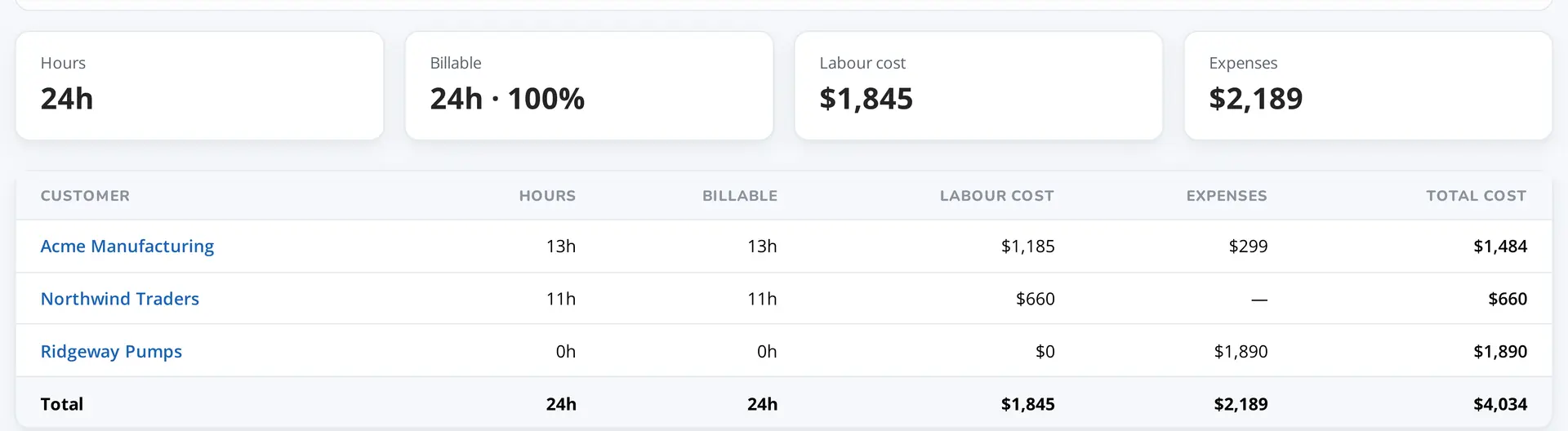
Reports from approved weeks
Hours, billable hours, labour cost and expenses for any period, by customer, project or person, counting only weeks that have been approved.
- Drill down from a customer to its projects and people
- Export every entry behind the table as CSV
- Unapproved hours shown as pending, not quietly counted
And the things that make it work for a team
Share a project with the client
A read-only link to the plan, the tasks and what you're waiting on from them, with your logo. Never budgets, costs or hours. Links can expire and carry a passcode.
Notifications
People hear when they're put on a task and when its status changes, in the bell or by email, as each person chooses.
Roles that fit the team
Admins, VPs, managers and members. Everyone sees the plan; only managers and up see the money.
Plan before you hire
Give a task to a label like "Design engineer" or "Tooling supplier", then put a person on it later.
Reschedule safely
Move a task later and the tasks after it follow, keeping their working days. Moving one earlier never drags anything with it.
More than one organization
Belong to several workspaces and switch between them; each keeps its own people, rates and data.
Your data stays in your workspace
Every organization's projects, people and costs are kept separate, and access follows the roles you give. Read the privacy notice for exactly what we hold and where.
- Separate workspaces. Members only ever see their own organization's data.
- Verified sign-ups. New accounts confirm their email address; everyone else joins by invitation.
- Protected sign-in. Encrypted connections, bot checks and limits on repeated attempts.
- History is kept. Logged hours and expenses can't be deleted out from under a report.
Know where every project stands
See it with your own projects: we'll walk you through it and set up your workspace with you.